
Matrix-first, by design
Vectors and matrices belong in the language, not behind layers of setup. Write matrix literals and work with familiar 1-based indexing.
Sunnylabs is building a language and a dedicated workspace for mathematical computing. Less distance between your ideas and the code that brings them to life.
Scientific programming should let you focus on the problem in front of you. Not the ceremony around it.
We are bringing a mathematically expressive language and a focused development environment together. One connected workflow for students, engineers, researchers, and curious developers.
Meet the ecosystemThink in matrices.
Write in a language that understands them.
% A small system. A clear solution.A = [3, 1; 1, 2];b = [9; 8]; x = solve(A, b);d = det(A); disp(x);disp(d);[2; 3]
5Interpreted with SunVectors and matrices belong in the language, not behind layers of setup. Write matrix literals and work with familiar 1-based indexing.
Multiply matrices, apply element-wise operations, transpose, find determinants, and solve linear systems with concise expressions.
Build more expressive programs with conditionals, loops, switch statements, and structured error handling using try/catch.
These examples use the interpreter. Native compilation supports a smaller, evolving subset.
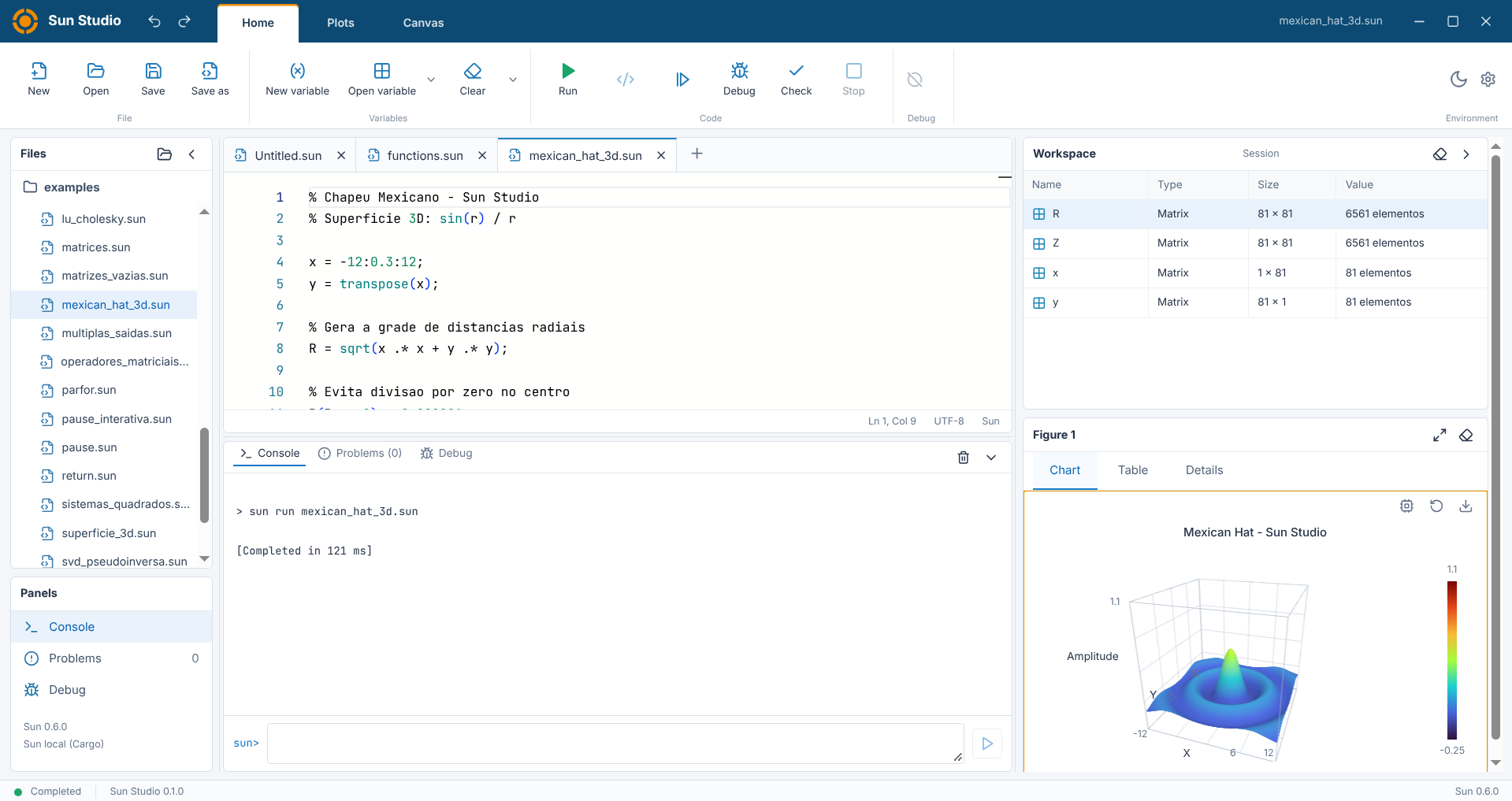
Sun Editor brings source code, execution feedback, and scientific exploration into the same place.
Explore the workspaceA Monaco-based editor and project explorer, built with Electron, React, and TypeScript.
Run and check Sun programs through the CLI-backed engine. Keep code and feedback close together.
Inspect variables and matrix values as you work. Scientific exploration remains an active area of development.
A work in progress, by design. Sun Editor is in active development. The screenshot above shows the Sun Studio desktop application. Its interface and capabilities may change as development progresses.
 Sun.
Mathematical syntax, numerical operations, and execution, with a CLI that works independently.
Explore Sun commandsA dedicated desktop environment to write, run, and explore Sun programs with useful context.
Discover the workspaceSmall commands. A direct path from source to results.
Execute with the built-in interpreter.
sun run experiment.sunCatch source diagnostics before execution.
sun check experiment.sunExplore expressions in an interactive session.
sun replInspect the tokens produced by the lexer.
sun lex experiment.sunCompile the currently supported subset through LLVM/Clang.
sun compile experiment.sunSun is in active development. Installation and native compilation availability may vary by platform and release.
Early days, clear intentions.
Sun is an experimental environment for matrix calculations, numerical experiments, and learning computational mathematics. Its interpreter supports matrix operations, linear algebra, and control flow. Capabilities continue to evolve as the language develops.
Yes. Sun supports conditional logic, for and while loops, switch statements, functions, and try/catch error handling alongside its numerical and matrix operations. Native compilation currently supports a smaller subset than the interpreter.
No. The Sun CLI can run and check source files and launch a REPL on its own. Sun Editor is the companion desktop workspace, integrating editing, execution feedback, and workspace inspection with the Sun engine.
Not yet. The LLVM/Clang compilation path supports a subset of the language, including selected scalar and dense-matrix operations. The interpreter supports more operations. Native compilation capabilities are evolving alongside the interpreter.
Explore a language designed for mathematical thinking.
Discover a focused workspace for your next numerical experiment.